Overselling Explained: The 5 Most Common Causes
Overselling is a data problem, not a demand problem. Here are the five root causes — and how to fix them.
Overselling is a data problem, not a demand problem. Here are the five root causes — and how to fix them.
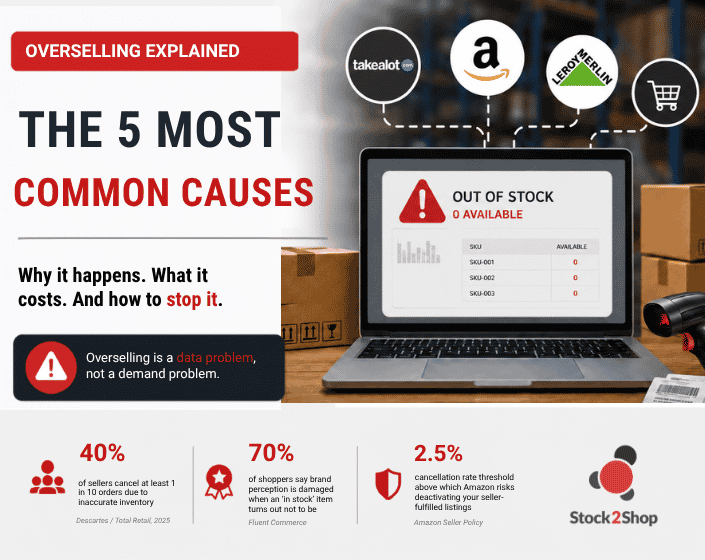
Overselling in ecommerce has one root cause: your sales channels are showing stock that no longer exists in your warehouse. According to research published by Descartes and Total Retail (2025), 40% of ecommerce sellers cancel at least one in every ten orders due to inaccurate inventory data. Nearly 70% of shoppers say their perception of a brand is damaged when a product shows as available and then turns out not to be.
It is almost never a demand problem. It is a data problem — specifically a gap between what your ERP knows and what your channels show. The five causes below all trace back to that gap.
Overselling occurs when a business accepts and confirms more orders than it has stock to fulfil. The customer receives an order confirmation, but the business then has to cancel because the item is no longer available. It is most common in multi-channel businesses where inventory is not synchronised across sales platforms in real time.
It is worth separating overselling from a stockout. A stockout means your channel correctly shows the item as unavailable. Overselling means your channel still shows it as available even though you cannot fulfil the order. Stockouts are a revenue problem. Overselling is a stockout plus a trust and compliance problem.
Before getting into causes, it is worth being direct about the stakes.
On Takealot, sellers operate under a Service Level Agreement with weekly performance metric reviews. Cancelled or late orders trigger compliance action. During peak retail season — November to February — Takealot applies stricter enforcement with longer suspension periods and no option to dispute.
On Amazon, the threshold is precise: a pre-fulfilment cancellation rate above 2.5% risks deactivation of seller-fulfilled listings. Exceed it further and account suspension follows.
On your own store, the consequences are slower but compound. Every cancellation triggers a refund, a support interaction, and — in many cases — a lost customer. Research from TCN Inc. puts the figure at 73% of consumers being inclined to switch brands after a poor service experience.
Overselling also distorts your demand data. Every cancellation muddies your sales history, which makes forecasting less accurate — increasing the risk of it happening again.
Here is where most articles on this topic go wrong: they frame overselling as a demand problem — a traffic spike, a flash sale, a viral moment. Those scenarios can create pressure, but they do not cause the oversell. The absence of accurate, real-time data does.
This is the cause most businesses with an ERP miss because they assume the connection exists when it does not — or that it is working correctly when it is not.
Your ERP — whether that is Sage, Syspro, SAP Business One, or something else — is where your stock levels actually live. It is updated when goods are received, when orders are raised, and when adjustments are made. It is your source of truth.
Your sales channels — Shopify, WooCommerce, Takealot, or your own store — need to reflect that truth. If stock data is being pushed to your channels via a manual export, a scheduled batch process, or a custom script that someone built years ago, there will be a lag. During that lag, your channel can show stock that no longer exists.
The fix is not to update your channels more often manually. It is to remove the manual step entirely. Real-time, automated sync means the number on your channel updates soon after your ERP does.
Many businesses extract a stock file from their ERP and upload it manually to their website daily or weekly. This may suffice on most normal trading days, but what happens during a promotion or a flash sale? The other risk is human error — your ecommerce manager might forget to update stock. With automated, regular data syncing, the chances of your customers seeing the wrong stock availability or pricing is virtually nil.
The interval that matters is not how often your sync runs. It is how long your channel can be wrong.
Once a business sells on more than one channel simultaneously — a Shopify store, a Takealot listing, and a WooCommerce site, for example — the inventory problem multiplies.
If each channel draws from its own stock count, or updates at different intervals, the same unit can be sold twice. Channel A shows 5 units available. Channel B also shows 5 units available. One sale on each channel depletes real stock to 3, but neither channel knows about the other’s sale.
This is why “we have stock in the system” and “but we oversold” can both be true at the same time. The stock exists; it has just been promised to more people than can be fulfilled.
The solution is a centralised inventory layer — one system that all channels draw from and update simultaneously. That system is your ERP, provided every channel is connected to it properly.
Every manual step in your inventory process is a potential discrepancy.
This includes: updating channel stock levels from a spreadsheet, adjusting inventory after a physical count, processing a return and forgetting to reinstate the unit online, or making a stock adjustment in the ERP that does not flow through to channels automatically.
It does not imply negligence — people are busy. Systems that require human intervention will have human error. The more manual steps in the chain, the more opportunities for the channel and reality to diverge.
For businesses that operate both a physical retail presence and an ecommerce store, this cause comes up frequently and is often the hardest to spot.
When a customer walks into your store and buys the last unit of something, your online store needs to know about it immediately. If the POS system and your ecommerce platform are not connected to the same live inventory pool, that unit stays visible online right up until you manually update it.
The reverse is equally true: online orders need to decrease stock immediately so that the same unit is not sold again in-store before the online order is processed.
Most overselling guides treat a surge in orders as the primary culprit. High demand does create pressure on any inventory system, but the surge does not cause the oversell. The absence of accurate, real-time data does.
A well-integrated business can handle a spike in demand without overselling, because the moment each unit sells, that information propagates to every channel. The hundredth customer who tries to buy something that has just sold out sees it as out of stock — not a confirmation page followed by a cancellation email.
The businesses that oversell consistently are not the ones receiving too many orders. They are the ones whose inventory data lags behind reality because their ERP is not connected.
Overselling is a symptom. The underlying condition is an ERP that is not functioning as the live source of truth for every channel you sell on.
Connecting your ERP directly to your sales channels via a purpose-built integration — rather than a custom script or manual process — addresses all five causes. A high-frequency sync reduces the lag between what your ERP knows and what your channels show. Centralised inventory means all channels draw from and update the same stock count simultaneously. Automated updates remove the manual steps where human error enters the process. Automatic order flow means every sale on every channel — including in-store POS — decrements your ERP stock immediately.
Stock2Shop integrates directly with Sage, Syspro, SAP Business One, Acumatica, IQ Retail, and other ERPs, pushing live inventory data to Shopify, WooCommerce, Takealot, Amazon, and other channels from a single connection. When stock changes in your ERP — for any reason — it updates across all connected channels automatically.
If you want to find exactly where your current setup is creating risk, the Overselling Audit walks through a 30-minute process to locate it.
References
Updated June 2026. Stock2Shop integrates with Sage, Syspro, SAP Business One, Acumatica and other ERPs to prevent overselling across Shopify, WooCommerce, Takealot and Amazon.
Keep up to date with ecommerce news, trends and articles. Brought to you by Stock2Shop.
Sign up todayWant to find out exactly how Stock2Shop can make your business more efficient and streamlined?
Contact Us